Email Scraper
Email Scraper
Pull Email Addresses from Web Pages
ScrapeBox Email Scraper – Included With ScrapeBox
- Comes as part of ScrapeBox
- Handles Lots of Connections At Once
- Support for Proxies
- Works Well with Automator
- Easy To Use Filters
- You Can Adjust The Number of Connections
- Inbuilt Site Crawler
- Can Grab Emails from Files on Your PC
- Adjustable Useragents
- Option to Fake Being a Human
- Save URL’s Along with Email Addresses
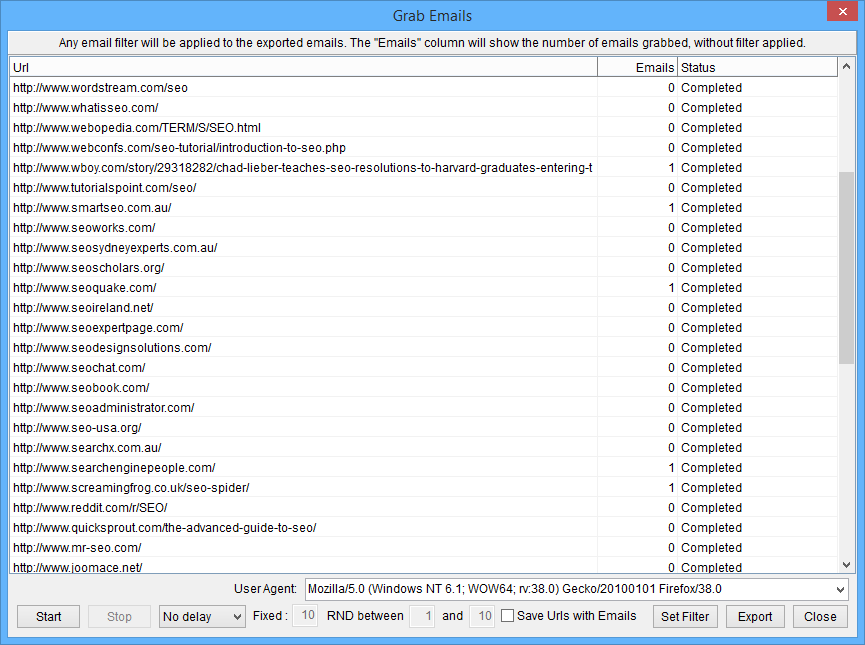
Having a hard time figuring out how to scrape email addresses from websites? No problem, ScrapeBox has got you covered. It comes with a serious email scraper which can pull email addresses from web pages, and also has proxy support so you can mask your identity or stop getting blocked by IP address due to too many requests.
The ScrapeBox email grabber can handle all sorts of websites, including those that use https like Facebook and Twitter, and has an adjustable user-agent option – so you can pretend to be Googlebot or any other browser to work on websites that block that sort of thing. When you export the email addresses, you can also save the webpage URL so you know where each email came from, and you’ve got loads of options for filtering to get the exact emails you need.
One of the great things about the email grabber is that it’s multi-threaded, so you can control the number of simultaneous connections and the timeout to get the best out of it – whether you’ve got a super fast server or a home connection. This thing can also pull emails from files on your PC if you’ve got a text file or sql database with lots of information including email addresses – just load that file up in ScrapeBox and it will do the rest.
If you need to get hold of the actual web pages that have the email addresses on them, then ScrapeBox has got you covered with its Search Engine Harvester – it can search 30 different search engines like Google, Bing and Yahoo, and it’s got loads of other features to help you get the URL lists you need, like the Internal External Link Extractor and the Sitemap Scraper.
And to make life even easier, the people behind ScrapeBox have recently added the ability to scrape email addresses by crawling a site – just enter the domain name and tell it how many levels deep you want to search. It’ll go off and grab all the email addresses on the homepage, then visit each of those pages and do it all again for you. It’s a great way to get emails from a specific site.
So if you’re looking for some good software to find email addresses on the internet – ScrapeBox is the one to go for. And if you can’t find the email addresses on the web pages, you can use the Whois Scraper Addon to get the registrant email and contact details from the domain’s Whois information.