Create XML Sitemap
XML Sitemap Generator
Building Your XML Sitemap
- Turn a bunch of URLs into XML
- Randomize the change frequency – and make it look legit
- Assign a priority to your pages
- Get the XML creator working smoothly with software that automates tasks
- Create sitemaps from URLs spread across multiple domains
- This tool is part of the ScrapeBox bundle
We all know how important sitemaps are for getting people to stumble upon your URLs. They help search engines find your content & crawl all your pages so they show up in the results. But have you ever wondered how to actually create one of these XML Sitemaps?
ScrapeBox comes with a super powerful XML Sitemap creator that can take raw URL lists and turn them into search engine ready XML Sitemap files. Most sitemap creators are pretty basic – they can only deal with URLs from one domain, you need to have a web server to install a script & fiddle around with, and it’s all pretty time-consuming. What if you want to create a sitemap with URLs from multiple domains, like all your backlinks, or you don’t have the permissions or the know-how to install scripts?
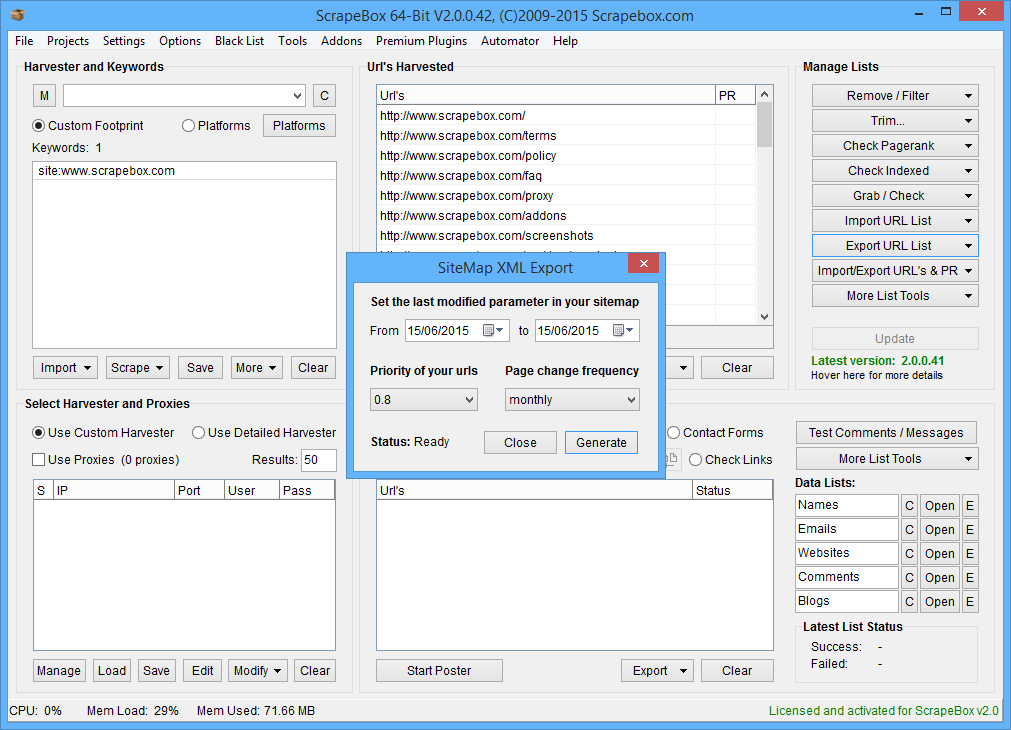
Check out the screenshot up above – I used the ScrapeBox search engine harvester to grab all the URLs from Google that match the search term “site:scrapebox.com”, then I used the “Export Sitemap XML List” feature in ScrapeBox to create the sitemap, which also lets you set the priorities & last update dates. Want the change dates to be random? No problem, just select a date range. The end result? A fully-fledged XML Sitemap like this one.
Time it took from starting with nothing to having a complete sitemap for the whole site? Just 15 seconds!
If you don’t want to use search engines to get your URLs, you can use the ScrapeBox Internal/External Link Extractor add-on to do the job. And if that’s not enough, ScrapeBox also comes with a Sitemap Scraper add-on, which lets you scrape URLs from sitemaps – not just create them.